

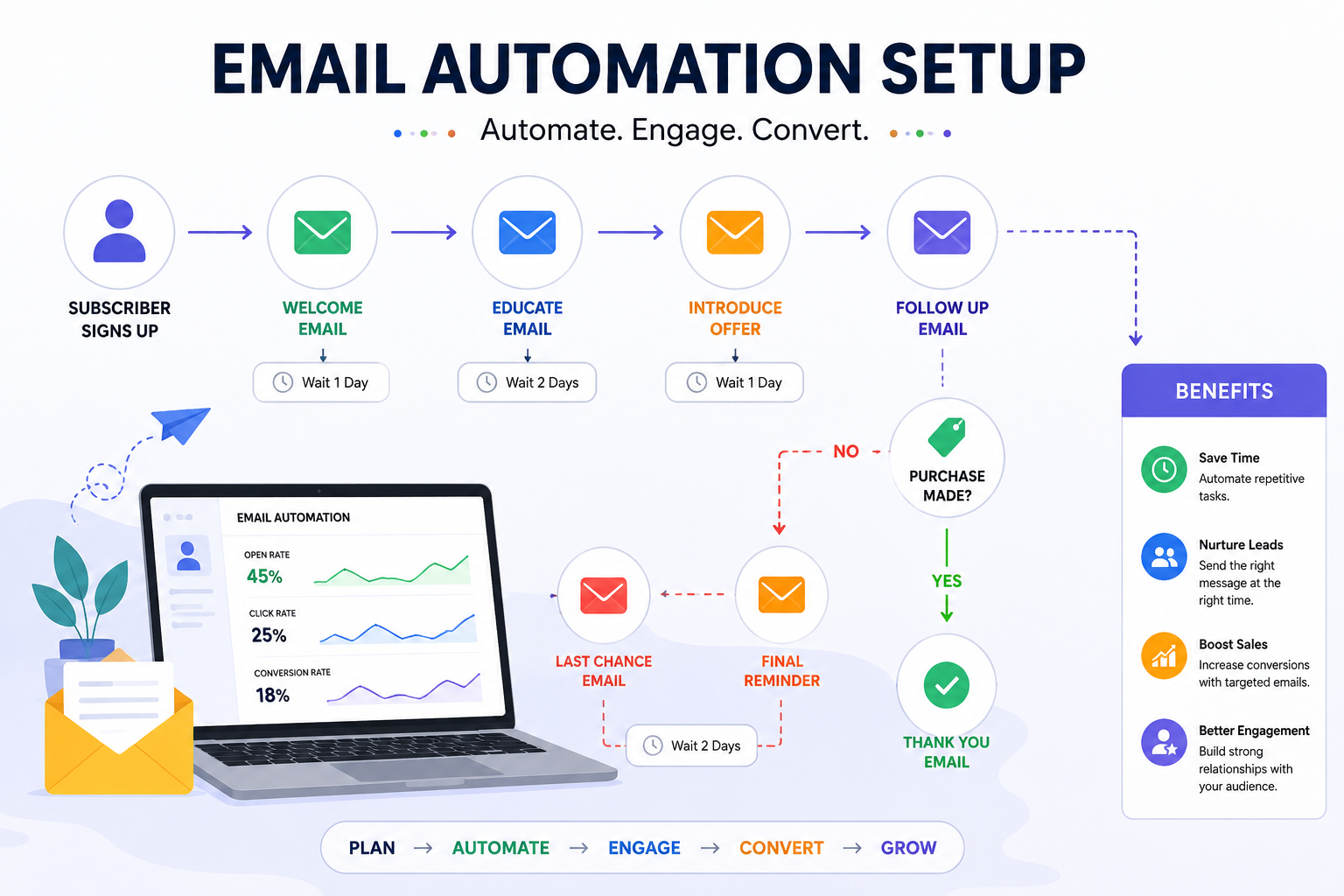
Email Automation Setup: A Complete Guide to Streamline Your Marketing
Email automation is one of the most powerful tools in digital marketing. It allows businesses to send the right message to the right audience at the right time—automatically. Instead of manually sending emails, automation helps you nurture leads, increase engagement, and boost conversions with minimal effort.
In this guide, we will explain how to set up email automation effectively for your business.
What is Email Automation?
Email automation is the process of sending emails automatically based on user actions, behavior, or predefined triggers. For example, when a user signs up on your website, they receive a welcome email instantly without manual effort.
This not only saves time but also ensures consistent communication with your audience.
1. Choose the Right Email Marketing Tool
The first step is selecting an email marketing platform that supports automation.
Popular tools include:
- Mailchimp
- Klaviyo
- HubSpot
- ActiveCampaign
These tools offer features like automation workflows, segmentation, and analytics.
2. Build Your Email List
You need a strong email list to start automation.
Ways to collect emails:
- Website signup forms
- Lead magnets (free eBooks, templates)
- Landing pages
- Checkout pages
Always focus on quality over quantity.
3. Segment Your Audience
Not all subscribers are the same. Segmentation helps you send targeted emails.
You can segment based on:
- User behavior
- Purchase history
- Location
- Interests
This improves open rates and engagement.
4. Create Automation Workflows
Automation workflows are sequences of emails triggered by user actions.
Common workflows include:
- Welcome series
- Abandoned cart emails
- Lead nurturing emails
- Re-engagement campaigns
Each workflow should have a clear goal and message.
5. Write Engaging Email Content
Content plays a key role in email automation success.
Tips:
- Use catchy subject lines
- Keep emails short and clear
- Add personalization (name, preferences)
- Include a strong call-to-action
Good content increases click-through rates and conversions.
6. Set Triggers and Timing
Triggers define when an email should be sent.
Examples:
- User signs up → Welcome email
- User abandons cart → Reminder email
- User makes purchase → Thank you email
Timing is important—send emails at the right moment for better results.
7. Test and Optimize Campaigns
Always test your email campaigns before launching.
You can test:
- Subject lines
- Email design
- CTA buttons
Use A/B testing to find what works best and improve performance.
8. Track Performance
Use analytics to measure your email marketing success.
Track:
- Open rates
- Click-through rates
- Conversion rates
- Unsubscribe rates
These insights help you refine your strategy.
Benefits of Email Automation
- Saves time and effort
- Improves customer engagement
- Increases sales and conversions
- Builds long-term relationships
- Delivers personalized experience
Conclusion
Email automation is a must-have strategy for modern businesses. It helps you communicate effectively with your audience while saving time and improving results. By choosing the right tools, creating targeted workflows, and optimizing your campaigns, you can turn email marketing into a powerful growth engine.
Start setting up your email automation today and take your marketing to the next level!
Automate your emails, engage your audience, and grow your business effortlessly!